// post · 736
Australian Retro Computing
I've created a forum for Australia Retro Computing
I've created a forum for Australia Retro Computing
So after upgrading my Core2Duo 2.4GHz MBP to have an SSD, my i7 iMac is basically unusable now....
Sure having an i7 chip is nice (I run a bunch of VMs, xcode, bloated iTunes and the famous ram hog Safari) but 8gb isn't enough ram and the slow HDD just kills it.
Basically I need at least 16gb of ram or an SSD (both would be nice!).
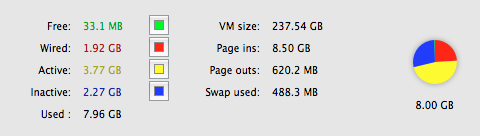
Same issue with the MacBook Air (not that I own one), just needs 8gb of ram and it would be sweet, 4gb isn't enough at all.
So my old MacBook Pro has been working pretty well for 2 years now, but it was sloooow.
So I purchased an SSD for it, and wow. It now feels faster than my 27" i7 iMac!
Any new computer I purchase now will need an SSD, I am very impressed with the speed increase.
So yeah, SSD for the win!
I upgraded from my white macbook the other day (10 days ago :p) to a MacBook Pro 15" (base spec: 2.4GHz, 2gb Ram, 250gb HDD, Geforce 9600 256mb).
I picked it up from the online apple store for $AU2699 (refurbished model, but in perfect condition) and it is great. The screen is much better than the old macbook and it can play some games too.
I'm currently dual booting Mac OS and Windows 7 Beta.
I just picked myself up an old PowerBook Ti off ebay (yes I like collecting random old stuff), and I was surprised how fast it was.
Specs:
I installed Leopard on it via Firewire (off my iBook G4) and it works really well. The screen is great and it is more than fast enough to browse the internet on with multiple tabs.
I have an iphone on the way. Native Exchange with push email support is going to be awesome.
I got a Mac Mini for my birthday on the 21st. Specs:
Core 2 Duo 1.83GHz
1gb Ram
80gb HDD
Leopard.
It's awesome! I'll post some pictures later.
Massive