// post · 356
Installing "Linux-2200" onto the IBM Netvista N2200 (8363)
I thought the documentation on installing Linux onto the N2200 wasn’t great so I decided to write up something myself.
Please note that I did not write or compile this software, the original source of this program can be found here.
Things you’ll need:
Local Mirror of Linux-2200 (Aust): http://michaeldale.com.au/files/N2200/linux-2200-0.2.1.tar.gz
Original Location: ftp://ftp.berlios.de/pub/linux-2200/linux-2200-0.2.1.tar.gz
Latest BIOS for N2200: http://michaeldale.com.aufiles/N2200/bflash.2200
Make sure you have all this stuff before you start.
Notes:
You will need to be logged in as root for most of this installation, if you feel you may break something use a live CD.
I used Ubuntu 4.10 on my PC as that is what I had on CD at the time. This can be downloaded from here.
If you don’t feel like downloading a 600mb ISO you could try damn small linux, this should work too, although I haven’t tried it
(Note: Some people have had issues with Fedora 4 and 5 when creating the image on the CF card).
Some people have had problems with certain CF cards, although many have gotten theirs to work after reformatting the card and trying again. If you have a camera that supports CF, try formatting the card in this first.
Installing Linux-2200
The first step is to create a partition on your CF card. I used fdisk to do this. In most cases the CF card is seen as a SCSI device and will be in the form /dev/sdX where X is the SCSI number (a,b,c etc). If you have no other SCSI devices it should be /dev/sda, if you have a multi format card reader (or USB stick plugged in) it maybe /dev/sdb /dev/sde etc.
Create a new Linux partition (you want it set to partition 1) Then write and close. Now you can create the Linux file system.
(1 being the partition) Now you can mount the drive
Now extract the linux-2200 tar file to a place onto your hard drive:
open the folder linux-2200-0.2.1 Copy everything inside it to your CF.
If you need to update your N2200 BIOS copy bflash.2200 to the root of the CF card too. Now un-mount the CF card.
Put the CF card into your N2200.
If you need to upgrade your N2200 BIOS press ESC on start up and choose to boot off the flash card and point the system to boot from /bflash.2200. Then restart the system. The BIOS should be upgraded and the system will restart. Go back into the BIOS and make sure the system now boots off /linux.2x00 (not 2200). Linux-2200 should now be running on your system .
Installing software
The following is taken from here:
I have both a N2200 EXX and an WXX.
The EXX is the standard Ethernet version with no flash card by default. The WXX is the Windows CE version with a 16mb flash card.
Unfortunately my WXX doesn’t power on, it seems as though about 7 capacitors have blown on the system. I am looking into replacing them although I don’t know if this will bring it back to life.
The capacitors are 1500 microfarad at 6.3volts (although voltage isn’t an issue as long as it is at least 6.3volts).
It seems that is was fairly common on the N2200, although I think it maybe only the WXX model as my 4 EXX systems are fine.
Have a look at the photos below, the WXX is on the left (blown capacitors are in lower left).
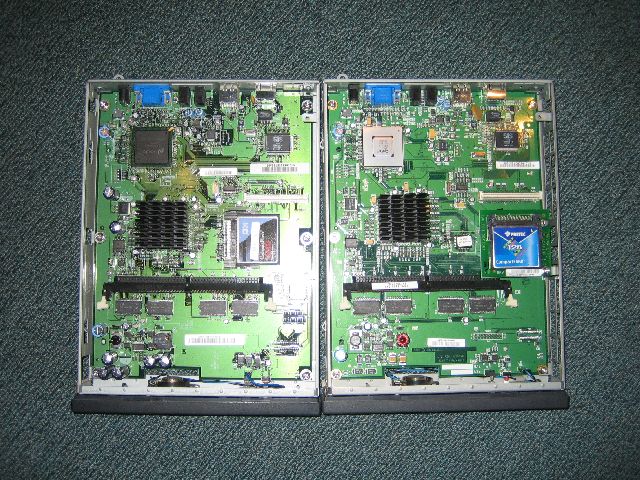
The 16mb flash card in the WXX contains Windows CE although this doesn’t work on the EXX model. Apart from that (and the small motherboard differences) the systems are almost identical. Each system has a Cyrix MediaGX subsystem (Video and CPU).
Linux-2200 is a very basic Linux install based on Debian. It is quickly done and probably needs a little work. Here are some configuration changes I did to the system after I installed it. Make sure you make these changes to the flash card (and not the ram disc). Fixed the keyboard mapping as it is set to a German style keyboard.
A quick note on performance
There are some issues with Linux-2200, for example the web browser included (dillo) at its current version does not support CSS and many other things. I plan on getting firefox running on it, so I will update this page when/if it gets done. I would also like to redistribute Linux-2200 with some small changes (including the fixes above and firefox)
Other Software for the N2200 Other Links
Please note that I did not write or compile this software, the original source of this program can be found here.
Things you’ll need:
- A Netvista N2200 thin client
- A Linux box (I used a live Ubuntu CD has I don’t have any Linux systems)
- A Compact Flash (CF) card (min 64mb)
- A card reader or some way of modifying the CF card on your Linux system
- linux-2200-0.2.1.tar.gz (29mb)
- Latest BIOS for N2200 (520k)
Local Mirror of Linux-2200 (Aust): http://michaeldale.com.au/files/N2200/linux-2200-0.2.1.tar.gz
Original Location: ftp://ftp.berlios.de/pub/linux-2200/linux-2200-0.2.1.tar.gz
Latest BIOS for N2200: http://michaeldale.com.aufiles/N2200/bflash.2200
Make sure you have all this stuff before you start.
Notes:
You will need to be logged in as root for most of this installation, if you feel you may break something use a live CD.
I used Ubuntu 4.10 on my PC as that is what I had on CD at the time. This can be downloaded from here.
If you don’t feel like downloading a 600mb ISO you could try damn small linux, this should work too, although I haven’t tried it
(Note: Some people have had issues with Fedora 4 and 5 when creating the image on the CF card).
Some people have had problems with certain CF cards, although many have gotten theirs to work after reformatting the card and trying again. If you have a camera that supports CF, try formatting the card in this first.
Installing Linux-2200
The first step is to create a partition on your CF card. I used fdisk to do this. In most cases the CF card is seen as a SCSI device and will be in the form /dev/sdX where X is the SCSI number (a,b,c etc). If you have no other SCSI devices it should be /dev/sda, if you have a multi format card reader (or USB stick plugged in) it maybe /dev/sdb /dev/sde etc.
Fdisk /dev/sda
Create a new Linux partition (you want it set to partition 1) Then write and close. Now you can create the Linux file system.
mke2fs /dev/sda1
(1 being the partition) Now you can mount the drive
Mount /dev/sda1 /mnt/someplace
Now extract the linux-2200 tar file to a place onto your hard drive:
tar -xzf linux-2200-0.2.1.tar.gz
open the folder linux-2200-0.2.1 Copy everything inside it to your CF.
cp -a linux-2200-0.2.1/* /mnt/someplace cp -a linux-2200-0.2.1/.fluxbox /mnt/someplace cp -a linux-2200-0.2.1/.xinitrc /mnt/someplace
If you need to update your N2200 BIOS copy bflash.2200 to the root of the CF card too. Now un-mount the CF card.
Umount /mnt/someplace.
Put the CF card into your N2200.
If you need to upgrade your N2200 BIOS press ESC on start up and choose to boot off the flash card and point the system to boot from /bflash.2200. Then restart the system. The BIOS should be upgraded and the system will restart. Go back into the BIOS and make sure the system now boots off /linux.2x00 (not 2200). Linux-2200 should now be running on your system .
Installing software
The following is taken from here:
You must have a Debian Woddy Linux.Software included
First look where the app (for example:Nedit) you needed is:
$ whereis nedit
nedit: /usr/X11R6/bin/nedit
copy nedit to your card
cp /usr/X11R6/bin/nedit /yourcard/usr/X11R6/bin
look which libraries needed by Nedit
$ ldd /usr/X11R6/bin/nedit
libXm.so.1 => /usr/lib/libXm.so.1 (0x40021000)
libXpm.so.4 => /usr/X11R6/lib/libXpm.so.4 (0x4014b000)
libXext.so.6 => /usr/X11R6/lib/libXext.so.6 (0x4015a000)
libXt.so.6 => /usr/X11R6/lib/libXt.so.6 (0x40167000)
libSM.so.6 => /usr/X11R6/lib/libSM.so.6 (0x401b1000)
libICE.so.6 => /usr/X11R6/lib/libICE.so.6 (0x401b9000)
libX11.so.6 => /usr/X11R6/lib/libX11.so.6 (0x401cf000)
libm.so.6 => /lib/libm.so.6 (0x402a9000)
libc.so.6 => /lib/libc.so.6 (0x402ca000)
/lib/ld-linux.so.2 => /lib/ld-linux.so.2 (0x40000000)
look if the libaries are on your card, otherwise copy the missing libraries to yourcard. Make sure the libary isn't a link.
example:/usr/X11R6/lib/libXt.so.6
ls -l /usr/X11R6/lib/libXt.so.6
lrwxrwxrwx 1 root root 12 4. Apr 2004
/usr/X11R6/lib/libXt.so.6 -> libXt.so.6.0
you see /usr/X11R6/lib/libXt.so.6 is linked to libXt.so.6.0
to copy both (the lib and the link) make
cp -a /usr/X11R6/lib/libXt.so* /yourcard/usr/X11R6/lib
In this case (nedit) thats all. Some apps needed more files (configuration files, etc) or depend on other apps, then you have to look into the docs,to google or to find it out by "try and error".
- Dillo 0.8.3 (web browser)
- XMMS 1.2.7
- Fluxbox window manager
- Nedit
- Un-patched 2.4.21 Kernel
I have both a N2200 EXX and an WXX.
The EXX is the standard Ethernet version with no flash card by default. The WXX is the Windows CE version with a 16mb flash card.
Unfortunately my WXX doesn’t power on, it seems as though about 7 capacitors have blown on the system. I am looking into replacing them although I don’t know if this will bring it back to life.
The capacitors are 1500 microfarad at 6.3volts (although voltage isn’t an issue as long as it is at least 6.3volts).
It seems that is was fairly common on the N2200, although I think it maybe only the WXX model as my 4 EXX systems are fine.
Have a look at the photos below, the WXX is on the left (blown capacitors are in lower left).
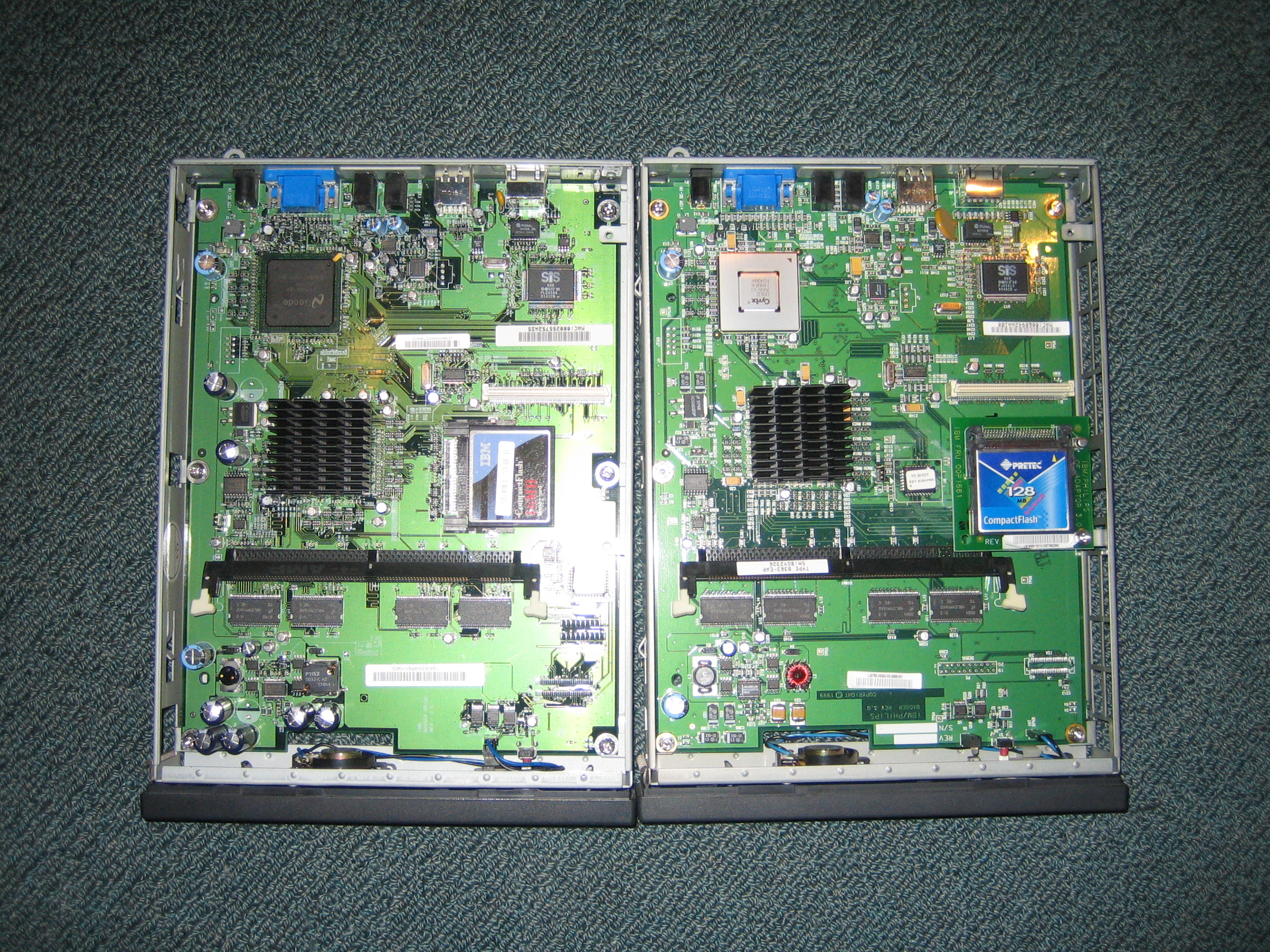
The 16mb flash card in the WXX contains Windows CE although this doesn’t work on the EXX model. Apart from that (and the small motherboard differences) the systems are almost identical. Each system has a Cyrix MediaGX subsystem (Video and CPU).
- CPU at 233MHz with 16k L1 memory (no L2)
- 3mb shared video card (up to 1280x1024)
- 32mb ram on board with a standard SDRAM slot, which can handle up to 256mb (288mb total)
- Compact Flash slot
- Ethernet
- 2x USB 1.1
- External power brick
- Microphone and Headphone slots
- Small internal speaker
- Completely silent, no fans (CRT monitor makes more noise)
Linux-2200 is a very basic Linux install based on Debian. It is quickly done and probably needs a little work. Here are some configuration changes I did to the system after I installed it. Make sure you make these changes to the flash card (and not the ram disc). Fixed the keyboard mapping as it is set to a German style keyboard.
- Delete the line “loadkmap < /key.map” from /etc/inti.d/rcS
- Remove /usr/X11R6/lib/X11/xkb
- change the IP address in /etc/resolv.conf to an ip address for your local (or ISP) DNS server
A quick note on performance
- System boots very quickly
- Runs happily on the base 32mb ram (although I’d recommend 64mb)
- XMMS plays mp3s without problems, although can skip if you are doing more than a few things
- Faster than I expected for a 233MHz Cyrix system with no L2 cache
There are some issues with Linux-2200, for example the web browser included (dillo) at its current version does not support CSS and many other things. I plan on getting firefox running on it, so I will update this page when/if it gets done. I would also like to redistribute Linux-2200 with some small changes (including the fixes above and firefox)
Other Software for the N2200 Other Links
// leave a comment
› comments help
HTML allowed: <a href="" title="" rel=""></a> <b></b> <blockquote cite=""></blockquote> <em></em> <i></i> <strike></strike> <strong></strong> <li></li> <ol></ol> <ul></ul>
ie: <b>bold</b>
Your comment may need to be reviewed before it is published.
// comments
Anywho, if you know where to get 1500uF Caps from let me know! I've had a quick look at a few places and no one has them.
Thanks.
regards
Rafael
The web browser on Linux-2200 doesn't support SSL or CSS, so I really need to get firefox working on it.
With a bit of work the software could be pretty good too, remember it is just a standard x86 linux install with a lot of stuff cut out.
Mp3s work fine in XMMS.
If you can get one cheap, have a play with it.
The newer flash based cards are pretty good now days anyway.
And anyway, I'd play the MP3s off a remote server and thus there wouldn't be much data written to the CF card (or read too).
As I am having trouble booting my N2200 into a 'rdesktop' screen, I thought I would ask if anyone has the Firmware for a NetVista N2200(EXX OR WXX) for Booting WBT(Window Based Terminal)
A kind friend sent me a copy(dd) of thier 16MB Flash Card that Booted straight into WBT(contains Windows CE), however there's was a NetVista N2200(8363 WXX) while mine is a NetVista N2200(8363 EXX)
Because of the different Firmware, I get the ERROR:
--------------------------------------------------
NSB02500 This thin client not authorized to load the window based terminal operating system
--------------------------------------------------
My original Firmware is: NS Boot Version B3052500 (05/25/00)
I also tried a Linux specific version - BL072902(07/09/02) but that also did not work :(
BTW: If anyone wants a copy of WBT v1.5(Windows CE) for the IBM NETVISTA 2200 let me know - it fits onto a 16MB Compact Flash card :)
Tom
Yes booting Windows CE is all to do with the Firmware.
Windows CE(WBT 1.5) can boot off EXX as well as WXX
There are heaps of 8363 EXX being sold on eBay that come with the 16MB Compact Flash pre-installed(with WinCE) that 'correctly' boot WinCE
Here is one being sold on eBay that IS an EXX model with an EXX Firmware that Boots the Pre-Installed 16MB WinCE
If you ask(like I did), the person will email screen shots of the WinCE booting up on this EXX model togeather with screen shots of all the settings:
http://cgi.ebay.com/ws/eBayISAPI.dll?ViewItem&item=5787147488&indexURL=2#ebayphotohosting
This is because some EXX models came pre-installed with WinCE ... this was BEFORE the release of WXX
When WXX came out, they stopped pre-installing WinCE on selected EXX models
** BTW: Do you know how to 'EXTRACT' the Firmware/Bios from an 8363 EXX/WXX ???
If you come across a Firmware that boots WinCE, please think of me & email it to me if you can find the time :)
Tom
ready to copy across onto the Flash Card in either tar.gz or zip/rar format
I have tried to install rdesktop but after a successful configure, I get errors on make
This has been requested before but as yet no one has replied
I have installed rdesktop v1.4.1 OK
Tested it by connecting to windows 2003 & all is OK
Tell me what rdesktop files you need so I can copy them from my Linux box for you & others ?
I can host them on my homepage(zip/rar)
my rdesktop executable is located in /usr/local/bin/
are there lots of other rdesktop files/libs/ .. etc ??
I installed rdesktop v1.4.1 onto Linux-2200
runs like a charm :)
onyl qerk is the 'backspace' button acts the same as the 'delete' button even though I have set emulation to server keyboard ... weird
Tom
My settings: rdesktop -k en-us -f -x l -a 16
** 2 Problems :((
1) Even though xTerm can run Full Screen, RDP from Windows Server 2003 appears at 15" size on my 17" monitor ??
- Even though I used the correct Full Screen Flag
2) 1 Keyboard key is not working properlley
The 'Backspace' key acts/works like the 'Delete' key & does NOT backspace
- Even though I am using the 'en-us' server keyboard map flag
Do you know any way to fix these 2 problems ???
Tom
On a side note. If you'd like to monitor just the RSS feed (comments) for this post you may through this link:
http://www.bluetrait.com/archive/2005/08/07/installing-linux-2200-onto-the-ibm-netvista-n2200-8363/rss/
If you get the WXX running, here is a 'HowTo make a BackUp copy of the Existing Firmware(bios)'
http://www-307.ibm.com/pc/support/site.wss/document.do?sitestyle=lenovo&lndocid=MIGR-4KUJ5P&velxr-layout=printLenovo
Tom
I just bought an N2200 to play with. Going tol see how it goes with FreeBSD :D
I've only spent a few hours playing around with my new 8363-EXX, but i haven't got it to work yet.
I THINK I've set up the CF card and copied the files across properly. When I put it in the 8363 though and tell the BIOS to look at the flash first for booting, nothing happens. I can't point it to bflash.2200 - I get a few other kernel.2200 options but no bflash.2200.
Anyone got any hints for me?
Also - I reckon that there would be a market for people willing to properly install and configure Linux 2200 on a user-supplied card...
It should also be possible to do a bios upgrade from a tftp server too.
By BIOS ugrade, do you mean the bflash.2200 file? I've put that in the root directory on the flash disk.
How do you point to bflash.2200? In the network setup, the section where you can cycle through the various kernal.2200 files will only let me type 4 charachters - not enough for the filename.
Thanks again,
Alex
I had that problem where you couldn't insert enough characters. I fixed it by resetting the bios (there should be a setting in the bios to do that)
I've got it pointing to the file now... but I still get a 'No flash card detected' message in the boot log...
oh well - keep on trying I guess!
You may need to format it again. Also make sure that it is formatted with the correct file system.
Hopefully this works for you.
It's a no-name "Hagiwara Sys-Com" 256mb card. Do you reckon it's worth taking the plunge and buying a SanDisk card off ebay?
SanDisk CF card saves the day!
on giving bzImage, it giives error "Unsupported file type"
on giving vmlinux, the thin client simply shuts off.
How can i boot the thin client from network.
thanks in advance
nilesh
Try upgrading your bios and test vmlinux again.
There was talk about this in the forums (link posted above in my main post).
By CF card, do you mean a pen drive that is used over USB?
Is the TC capable of booting off a pen drive? Does it work with
USB-2?
compiled kernel (RH7.2) elf image, it simply powers off. It does boot
properly with kernel.2200 (supplied with the system). Why does this
happen?
What would be the correct way to compile the kernel so that
Netvista 2200 will boot properly?
Via TFTP, possibly, I haven't tried.
By CF card I mean Compact Flash (like what you use in a camera), it sits inside the computer (see pictures). It won't boot off USB. It can work with USB 2.0 but only at 1.1 speeds.
You're not running the latest BIOS. Use the BIOS from my main post and update the system.
Indeed, one kernel which failed to run on one of our TCs ran on another
having a later version of BIOS.
I would like to run an ELF boot loader to select on of several linux
installations to run on the TC. Is that possible?
I have not yet come across an ELF boot loader.
I am able to do this on a different brand of TC that supports regular
PXE booting (ie. it is able to run pxelinux.0, which has a binary format).
I have sucsefully flashed the bios by using tftp (tftpd32 running on xp) But I still have problems booting vmlinuz-2.6.9-ltsp-3 from the LTSP project. Any knowledge on where to get another kernel
Is it possible to run the Netvista 8363 with Linux 2200 without being attached to the network? mine gets stuck during boot "No netword detect. Is cable unplugged?"
I want to run it now attached to my network as a simple mp3 player. I was thinking some sort of network pass back might be possible, where the transmit line is connect back to the recive line to make it think it is attached to a network.
nfs would work too. n2200 doesn't support compressed kernel, hopefully someone will hack grub to work with n2200 soon.
I did the firmware upg by renaming bflash.2200 to kernel.2200. The box now shows BL072902 (0729/02).
However I'm running into two issues. One the box still insists on booting off off kernel.2x00, so i did a hard link between kernel.2200 to kernel.2x00. It now boots, to a point. After it mounts devfs on /dev, there are four messages "attempt to access beyond end of device" followed by a "Kernel panic: No init found."
Have been using the Netvista for a while now for generally surfing - it's awesome for other rooms where you wouldn't normally put a PC.
Has anyone got VLC to run? I'd love to be able to stream a DVD or other video feed from my network.
Thanks,
Alex
I have two problems:
1. In the boot menu (ESC) I can not define the file which should be booted. The menu entry exists but can't be used. When I want to access it, it disappears. :(
2. I followed the instructions but ended up with a Kernel panic.
"VFS: Cannot boot root device hda1 or 03:01" :(
Any suggestions?
You have to format your CF card properly.
# fdisk /dev/sda
(delete everything if necessary)
n, p, 1, a, 1, w
# mke2fs /dev/sda1 (or equal)
It was important to make the filesystem on sda1 insted of only sda! Keep that in mind if you face a similar problem.
Cool shit!
# fdisk /dev/sda
(delete everything if necessary)
n, p, 1, a, 1, w
# mke2fs /dev/sda1 (or equal)
It's important to use sda1 and not just sda!
Cool stuff!
I installed linux-2200 on my 8363 EXX and it works fine! As a proper browser (like FireFox) is missing I decided to just try a different distribution.... like DSL (a livelinux)
I installed the folders /KNOPPIX and /boot to CF (according to this script).
As the latest BIOS (BL072902) version seems to insist on loading /kernel.2x00 (same error like Hans, 12 Dec) I tried to set a symlink "ln -s boot/linux24 kernel.2x00" but it says "unable to load file via boot file server protocol"
Now I tried to get back to a "failsafe situation" and copied the linux-2200 files as I did before. But now I keep getting a "Kernel panic: Init not found". WTF!? I tried two different CF cards, both of which used to work before... but suddenly it's realy foobar.
I had
cp -a linux-2200-0.2.1/.fluxbox/* /mnt/someplace
instead of
cp -a linux-2200-0.2.1/.fluxbox /mnt/someplace
Is it possible to install a nfs sever on the n2200.
My idea is no use thinclient in combination with a external harddrive as nas system. Will this work?
http://www.wcm.at/forum/showthread.php?s=&threadid=185222
(This is on an EXX with the upgraded BIOS)
First I hit theis prob: I can "fix" that by creating a hard link from /bin/init.aus to /bin/init.
After that, init complains that it can't find inittab (which isn't there) and prompts me for the runlevel. Given the only rc information is rcS, I select "S" whereupon I get more "attempt to access beyond end of device" errors and a complaint that /bin/sh can't be run.
I suspect that the real problem is back at not being able to find init. Did either of the other two people with that problem solve it?
Thanks.
Let us know if you find anything.
I have found some hints that the NCP 564.NET Thinstar (neoware) ist able to boot Linux from IDE (CF-Adapter) with Grub and Lilo.
e.g. last 3 pages of http://www.wcm.at/forum/showthread.php?s=&threadid=185222
or a nice gal. www.hiltec.at
i will be recapping and some recapped units will be for sale.
nice project you have here and i will be playing with it.
my goal is to make mobile netstumblers from these.
i will post the tar of the end result too.
kc8adu@dayton.net
if the o.p needs that unit recapped feel free to contact me.
i do componant level repairs for a living.
Maybe you should search for some info on NetBSD, it is meant to work on all sorts of hardware.
I tried with a different CF card (pulled out of my camera), with the same result.
Unless SanDisk is the only brand which will work in them (neither card was) the only other thing I can think of is size; both are 256MB cards. Is there a (lower) upper limit on the size of flash card these boxes can handle?
I have installed linux-2200 to a Kingston 128MB CF card
Has anyone solved the problem?
Another thing. Dillo didn't transfer data from one php page to the next so I installed Opera. I found a statically linked version and just installed it on the NetVista and it worked. It's a little slow but it works.
Thanks all for the package and clues ... it's giving this hardware a second life.
Do you want to expand on "correctly"? Is there something more than the "fdisk + mke2fs" sequence from the article to be done?
Kernel Panic: no init found.
> fdisk /dev/sda
made 1 primary partition
then > mke2fs /dev/sda1
the first is sda and the second is sda1.
I put the uncompressed linux-2200-0.2.1.tar.gz and BIOS for N2200 onto the CF card. Flashed the BIOS by making the Netvista boot locally using the bflash.2200 file. Then confifured the Netvista to boot locally which makes it use the kernel.2x00 file. Then things started to work.
great forum here! i got my my 8363 running in no time following the instructions on this site. now i want to remote access my netvista using either ssh or vnc. anyone tried this before? im pretty much a linux noob and dont even know how to go about compiling new stuff for my 8363.
i hope someone can help!
Also a comment to the last post #65.
Not sure how easy it would be to setup either vnc or ssh.
I get all my packages from
http://packages.debian.org/oldstable/ the site is very nice and show dependencies, although some things are not there, or hard to find. I did not see an ssh server of a vnc server on there, but maybe I missed it.
I did however see a telnet files on there, but also while looking around in the files already in linux-2200 I have seen in.telnetd. not sure if it works or what but that maybe of some help to you.
I know telnet is not very secure, but atleast for me I only use the netvista as a network audio player. So I really could care less if some else has access to it.
I am actually current ( just started tonight) trying to slim down linux-2200 for my needs. Since all I do is play audio files I do not need X which gets rid of lots of stuff, then I do not need any other graphical programs. Right now I believe I am stable at around 25mb. I have a few compact flash cards around that are 32mb so it is nice to be able to use them. Just poking around right now messing around. Wish I new linux a little better as if I did probably get it down closer to 16mb. Not that space is much of an issue these days but smaller the thing ends up quicker it will boot. Anyway if anyone has already done something like this and want to share files I would appreciate it, if not I should have it fully trimmed down in the next few days. So if anyone wants it I would provide the files. ANyway final setup should hopefully be a mp3 player that play audio from a network server and also from pre-selected shoutcast stations. THis will hopefully all be controlled by telnet for the time being. This would allow the unit to be run headless. Anyway I am tired and just rambling. Anyway that is it for now
I'd be happy to host it here. Once you're finished send me an email
I see in.telnetd in /sbin so I figure atleast someone messed around with it?
Anyway I still slowly trimming away. I am at 13mb right now, but that is without a remote way to control it, not sure if that will be to big or not, but really should stay below 16mb for the whole thing. Also currently using mpg123 as the commandline player. It seems to work fairly well although it is only plays mpeg audio not vorbis or ogg. SO may go try another player soon, not sure.
Also commandline is a little ruff atleast for very simple usage. I want to try an make interface as nice as possible.
This is the main point of my posting here.
I found what I believe is a nice solution for the commandline. IT is a program call gamp and is just a front end that gives basic gui (remember no X) but looks to give it a much needed interface.
My problem is I can only find it in source, not compiled. I have plenty of linux systems, but no debian woody systems. Does anyone still have a debian woody system in which they could build me the gamp package???
So 2 questions anyone have any idea with telnet possibly save me some time? or ssh but preferably telnet as I figure there is less to worry about with using it (from config point of view)
And anyone care to compile gamp for me. Well thanks for your time.
Since I'm not linux pro, i hope someone can help: when I get the source files for sshd, is there an easy way to compile it with statically linked librarys? I know it's an ancient and unefficiant way, but it would reduce the hassle with multi-versions libs on the 8363.
It's an SSH Server with a small footpring especially for embedded Linux devices. I will try it out this weekend and report any results.
Anyway I did successful telnet into the box. Right now it is around 17mb in size, but still trying things out. I may be able to get a size back to around 13mb. Not sure yet. Being as this setup only uses telnet it is very unsecure, but it is only ment for music control so no big deal, but in effort to stop some unknowing person from having issues I am removing ftp ssh telnet. basically all the things that can access outside the netvista. So even if some gets into the netvista ( a possiblity) I will try to strip down everything that could cause anyharm. You do want someone listening in while you type in clear txt.
Also I am using mp3blaster as that supports ogg files as well as mp3. I am still getting used to working with mp3blaster, but it may just do the trick.
You do not want someone listening in while you type in clear text
Yes that would be possible. Two options:
1) Use another thread/post like this.
2) Or I could setup a discussion board in a forum that I have.
Also if you're interested I can host any of the files for others to access if you'd like (and even do CVS/Subversion).
There is only one more thing I really need to work out with setup I am working on. I have it start up and immediately start in.telnetd. Actually telnet works on standard setups, you just need to call in.telnetd -debug [portnumber] not sure the reason. Anyway the problem I run into is in in.telnetd. It allows me to control machine, but when I exit session it also exits the server, so I have to go back to the server and restart the in.telnetd. I maybe exiting the telnet session incorrectly I am not sure. But I would like to setup the deamon to just sit there and let me log on and then log off all I want.
that is a significant issue to totally resolve, but other than that I think the package is as small as it is going to get atleast without having to compile things from scratch. Right now with everything is a tar package it is right around 12.52mb I may add a few things back I am not sure. The gzip -9 verison is 4.9mb so it should be really light on your server.
And just need to test everything again throughly.
Either way to setup either a forum or a thread like this would be fine. I really do not mind it at all how it is, because I already read everything and not hard to keep up with new posts, but someone coming here and seeing 150+ posts might be hard to know where the quality info is located
Also again want to just point out http://packages.debian.org/oldstable this shows you all the dependencies and all the files are built with same dependency versions. So simple applications are easy to install. simple being maybe a text edit (nano) or a simple game. I found snake4 xbubble xgalaga(believe ran a little slow) xjump xoids and a few others were easy to install obviously this is not on my current setup but one in the past.
My apologies to anyone reading my posts. I am a bit tired but also a lazy typer, as well as a horrible speller.
Anyone got any ideas on how I can recover from this?
Okay guys little more updating to be done.
I got system 99% going. It seems in.telnetd is only suppose to listen for one connection then when someone logs in and then finally logs out the in.telnetd closes as well. For a little while I thought I would have to implement alot of code that is involved in started and stoping deamons on a linux systems, but then I realized the only thing I want the netvista to always be running is telnet. So I wrote a little shell script. Basically when computer starts up it boots into this little script I made. Think of it as a small program. So instead of starting into X and having flux going I have it start up into my program. What my program does it start up the in.telnetd. After it starts up my program waits till intelnet.d stops. When this happens my program start in.telnetd up again. One thing to note is you can only log into netvista with one computer at a time. That makes sense to me as only one persons needs to be controlling audio. I have it setup to restart in.telnetd 10,000 time this may change in the future, but this is a very large size and would never be met on a normal system, but incase something not sure what goes wrong I want it to stop after a while. This is a very simple value to change and actually for my use I may turn it to something like 1000. As I doubt that I would log in and out of netvista machine more than 1000 time before a reboot/poweroutage.
Anyway bulk of what I am going to do is done.
What I have left:
need to fix loading into ram. Right now I have system load into ram but for some reason it never actually uses that and stay with the original boot media ( for me it is a netboot server for others maybe compact flash card)
Along with solving above problem I need to clean up a few comments I have. I have output comments in the code so that I can see where the computer was booting to and why it did not get any further.
also change code to reflect booting for compact flash rather than network as most new people will probably boot from cf. I will probably include a file to easily make it boot from network and load into ram.
Also will need to write a user guide up for beginners. ANd mentions where any settings should and can be changed.
In the next few day I will send dale a copy of my work so he can host it. Hopefully someone out there can further improve on it. I think size is fairly good. it will be right around 13mb as I am going to reinstall nano a text editor on it. nano is much easier to use than vi.
Also in the next few weeks I may look at just trimming some reduandant fat on the standard linux-2200 as there are several reduandant things in there, which should allow me to free up some space. Probably not alot, but maybe up to 5 mb. But that is 5 mb that is not in memory so low memory systems may fair a slight bit better, and also boot times may be lower by a second or 2 not alot but a step in the right direction.
AS I am finishing up, i am just thinking of a potential problem. When you log into the server via telnet and put some music on. Well that music is tied to that telnet session. So when you shutdown the computer that you are telnet from into the netvista the music will probably stop. There maybe a way of allow the music to continue, but that may lead to another problem as telnet atleast how I understand it does not forward the terminal that would be at the local netvista side, but actually creates a virtual terminal for you. This is new for each new telnet connection. Anyone have any idea about this possible problem. It is not a huge problem atleast not for me as I have my one pc going 24/7 but would be really nice to have music indepenant of the one computer.
Also I found somewhat of a problem.I accidentially disconnect the power from my client side telnet. Since this was all at once it did not allow for any shutting down of the telnet session, so there server just sat there in the last telnet session. Not sure if it would eventaully return to listening for telnet connections or not. It may time out while waiting for a keep alive command from client telnet.
Anyway I am starting to believe there are probably alot of little things that need to be tweajed and setup for. In the next day of so I am going to submit my current working setup and hopefully someone can help me test for bugs.
Anyone want to be an alpha tester???
Right now, just barbones. I switched back to mpg123 for this point as I thought mp3blaster was giving me poor performance, but it may have be bad audio settings. So right now it works with just mp3 files. I have tested it out with network files and also shoutcast streams. It is a little picky about shoutcast streams as shoutcast formats streams a little differently than how mp3 should really be. But most of time plays fine. Really only has problems starting the stream not keeping it going, and it may just be a matter of correct calling of mpg123.
I have not messed around mpg123 to much yet. I really do not know many of the commands and controls for it.
Audio quality seems good.
Okay anyway this is barbones, I even went into the lib/modules/kernel and removed files in there. I really can not say what hardware will and will not work that can be attached to the device. The main goal is to start the machine with powercord ethernet cable and speakers connected, nothing else.
Also the alpha still is setup with it to boot from a nfs. If you run another linux box it is really easy to setup. Also making the changes to boot from compact flash should be very easy. I have not had luck with booting from cf as I do not have another linux machine that has a cf slot.
Anyway size is a hefty 9.6mb someone that was really trying to trim it down further may be able to get it to something like 9mb in total but I think that would probably be about it. Unless they compiled packages for this machine as compiling busybox and using some compact lib files could probably save another mb maybe even more.
Also since this version seems to work fine for now I think my main goal will be to reinstall mp3blaster and get that working again. I will probably be at 10.5mb then but still plenty of room to fit it onto 16mb cf cards.
"mountfiles &"
but I just needed
"mountfiles"
noit sure if issues stems with how bin/ash handles this or just in general even under bin/bash there maybe issues with it,
well anyway.
Currently only know issues is if client computer shuts down without notice netvista maybe locked on previous session for awhile(I am not sure how long) It maybe a simple fix to, I am not sure. If music was playing music should continue to play, atleast for a little while.
Also telnet client must be open to have music playing.
Other than these 2 things it is fairly complete(I believe).
10.6mb in total. Oh still netboot version.
The mp3 blaster interface looks much better than mpg123(none existant)
I have not used it alot, but once you get the hang of it it should be easy.
Also a note since such a system lends itself to shell scripting the interpreter on system is ash not bash just to let you know. ash is already built into busybox so I removed bash as it was near .5 megs Anyway I should have maybe a papge write up about how to use and what to change if anyone cares to use it.
Anyone interested???? anyway if anyone is interested just email at matthewwright161 at hotmail.com
From the looks of the files I would say you had to do a few different things to get it working, but I am not sure if they are just leftovers from the first release of linux-2200
The reason is that I know it does not work in the mp3blaster version I am working on. I deleted parts of the kernel (modules) I can easily put back the modules, but there is a configuration script as well. If it is the case that you have to run the config script I will have to reinstall bin/bash and change configuration files. I do not have any wireless usb adapter so I can not check.
If no one uses wireless adapter I will not even bother putting this back together. But if people do use wireless adapters then I may try to have a few scripts that you could run at first then after wireless is working just one more script to finish taking back out the files as once you have it configured you will not have to configure again.
So if there is any wireless user out there speak up. I will also need one of you to help testing the set of files I would be working on.
From: http://www-307.ibm.com/pc/support/site.wss/document.do?lndocid=MIGR-4KUJ5P
This procedure creates a copy of the NetVista thin client firmware (hereafter referred to as flash image) on a CompactFlash card.
NOTE: Once you have created a recovery CompactFlash card for a NetVista N2200 (8363), it can only be used to re-flash a NetVista N2200.
1. Remove the logic unit to install parts.
2. Insert the CompactFlash card into the CompactFlash connector. See Installing an optional CompactFlash card.
3. Move the jumpers on headers JP1 and J10 from the original configuration of 1 and 2 into a configuration of 2 and 3.
4. Reconnect the power cable to the logic unit.
5. Power on the thin client.
6. Wait for the system LED to flash green. If the system LED flashes amber, the image was not created. Repeat the procedure with another CompactFlash card, if possible.
7. Power off the thin client.
8. Remove the CompactFlash card and store it in a safe place.
9. Move the jumpers on headers JP1 and J10 back into the default configuration of 1 and 2. If the jumpers are not moved back into this configuration, the thin client may not function properly.
10. Reassemble the thin client.
I also found the keyboard language to be an annoyance - as the "german" keyboard layout remapped my US keys all over the place.
My solution was to do modifiy what was listed at the top : i.e.:
* Delete the line “loadkmap < /key.map” from /etc/inti.d/rcS
-> I commented it out instead
* Remove /usr/X11R6/lib/X11/xkb
-> here I edited the file [X0-config.keyboard]
while my flashcard was in my multi-FC-reader/writer and replaced the line
[Layout] from 'de' to 'us'.
Once I popped it back into the N2200, it was completely solved.
Toodles,
MM
Note : All of this was done as root...on my Xandros 3.x Business Edition Workstation (it wouldn' t allow editing as a simple user.
i tried to boot a NE2200 with bios B4071700.
Everything seems fine but instead starting linux after loading i get a black
screen and the fron led blinks.
i have installed the latest flash and used the example kernel
(can someone please change linux.2x00 into kernel 2x00 ??)
any ideas ?
On looking at the pictures above my EXX is identical to the WXX picture, so I'm thinking that I may have "stressed" it with repeated reboots while trying to get the BIOS settings right and now have some sort of partial power supply failure. The mention of bad caps in a few posts got me wondering what makes Dale think his WXX is bad because of the caps ( and how he isolated it to that as an issue).
I'll try to recover the image from a second machine that I have not messed with (yet). The instructions for creating the image are posted above, and then reloading is the same procedure with the headers J1(boot blk) in position 2&3 with J10 (pw override) in position 1&2
Sorry guys.
Has anyone had any luck with using samba with this? I've loaded the smbfs module, but I can't seem to mount with the command
mount -t smbfs -o username=username,password=password //ipaddress/share /mnt/share
It comes up with an Invalid Parameter error message?
I have now tried 4 different cards, 1x128, 2x256, 1x 512
The first and last were SanDisk, the two 256M other brands. All gave the same symptoms. I can think of three possibilities, none massively likely:
1) I'm setting up the card wrong (though how hard is it to stuff up fdisk + mke2fs?)
2) There's a DMA issue (where I work now, one of our MBs "thinks" it can do DMA on CF; pity it can't do it right) across all of the cards
3) My CF reader/writer is doing something screwy.
Only other idea I have right now is: Could someone give me access to a dd image - either 128M or 256M - from a card they have had working?
Thanks
I will post a link to the mount function in a few moments. let me know if it works
hopefully this works for you
I just installed Woody on an old box here, copying some additional programs to the flash drive as well. I'll see how it goes.
had the same problem: no init found. tried four different cards, same result.
so did mkdir /mnt/linux-2200-0.2.1
mount /dev/sdb1 /mnt/linux-2200-0.2.1
tar -xzvf linux-2200-0.2.1.tar.gz -C /mnt/
now it works
The only problem I have now is that it would appear that my (old, very old) monitor cannot keep up with the refresh rate set by the x server in linux-2200. Anyone know how to change the default refresh rate?
Thanks guys, good forum BTW!
HAL-LELUJAH!
HAL-LELUJAH!
hallelujah
hallelujah
HAL-LE-E-LU-JAH!!!
Yes, after all that, it came down to Fedora (4,5) I booted using a live CD of Ubuntu 6.06 and repeated the process.
And . . .
IT WORKED!!!!
(I also, just 'cause I could, maked the partition bootable, but that shouldn't make a difference as the box doesn't boot normally)
Now, after the better part of a year (on and off) trying to get the damn thing to boot, I can think about using it.
Thanks to all who suggested something along the way.
I've updated the post.
Wow what an awesome group! A friend and I just scored one of these N2200's each from a Computer market (curiosity), I've got to say you are all legends, I had mine up and running linux-2200 on a 1Gb CF card within a few hours of playing. My 2200 enclosure claims its a WXX, it came with WBT installed on a 16mb CF card, but the bios claims its an EXX. Either way Linux-2200 runs great!
Anyone bothered to mess with the PCI slot on the board yet?
-Andrew
I`m a newbie here but reading this site i got my netvista running on the firs tentative but there is a big problem that wasn`t discussed yet on this forum - so I`m thinking it´s a problem caused of my incompetence... Anyway I`ll post here hoping somebody can help me:
After booting the system my monitor is black & white and very dark - the way that I nearly cannot see anything.
In teh boot-menu i tried all resolutions e frequencies available. The testscreens always were OK..... My monitor is about fife years old 15`` - On my windows PC is working normally.
Is there anything wrong with graphical parameters configuration? How to correct this?
Thank you all
Thomas
Sorry for my bad English
Thanks!
I have had just one problem, which wasn't mentioned on the forum: your partition has to be of the type linux (83) when you create it in fdisk. Mine was fat16 at first and the system cannot recognize it that way. Maybe it can resolve some problems people had with non recognized cards.
Thanks again.
Is it confirm that there is no HWCLOCK in this hardware?
I recently bought a N2200w with no flash card.
My goal is to make it boot with dhcp/tftp diskless (with root mounted over nfs)
I've flashed NS Boot Code with BL072902.
My N2200w correctly get an IP by dhcpd and get tftpd server adress correctly (I assume), but when it tries to load given filename, it returns error code NSB83600 Boot file server protocol not specified
I thought that use of tftp was implicit in DHCP informations.
Is that a N2200w problem ?
The other thing is that I can manually (configuring a static ip address and static parameters in NS Boot) get a boot file via tftp (I tried the given kernel by IBM/Lenovo TurboLinux 7, but i can't give it nfsroot address).
Are there specific kernel settings/mode I have to put ?
I'm a little lost at this point, thank you.
well it works perfectly, You were right, it boots amazingly fast. at least twice as fast as my dual core desktop.
Well it's going in the car, as soon as i get a working gps receiver for it. It has ample processing power, it just needs a newer kernel. So i'm going to compile a gentoo 2.6 kernel for it. Should be able to strip it down well, just might need a tad more ram.
Such a nice little thing, i love it!!
Cheers Josh
I am following this forum from 3 weeks ago, trying to setup Linux-2200 on my 4 Netvista 2200 units.
I have been focused in find an explanation for my first problem:
why N2200 doesn't recognize my flash cards?
After lots of reboots and tests, I have important information to share here.
1. There is no way to change the name of boot kernel:
Netvista will always looking for "/kernel.2x00" on the root. The only thing you can change is the path and name for something you want to reach via network. In my case I've used this function to upgrade the bios flash by TFTP. Really easy.
2. Bios configuration, important information!!!
If you already solve the bios upgrade, next step is too boot from flash. For me, this was the most difficult part to understand.
In Netvista Bios, hit "configure network settings" menu.
In "Boot File Source" you must change it to "Flash" and after do this, next menu item - "Profile location" - will be unavailable. If you hit it, you will be kicked out to "Main Menu". This is just normal, not a bug.
3. Compact Flash Card.
First thing: All the information here is based on 128MB CF cards.
Something I never read here was something about "media format". Even if you format CF card with ext2 linux partition is not enough for Netvista recognize your card. Here you have a result of my particular success in 128 MB cards when I do "# fdisk -l /dev/sdb"
"Disk /dev/sdb: 131 MB, 131072000 bytes
16 heads, 32 sectors/track, 500 cylinders
Units = cylinders of 512 * 512 = 262144 bytes
Device Boot Start End Blocks Id System
/dev/sdb1 1 500 127984 83 Linux"
The important part was. Even if you create a partition in ext2 (83 - Linux), in case you have wrong Heads, Sectors and Cylinders, any information you put in flash card will not be recognizable by Netvista.
Resuming:
First you must configure media. This is what I made with success:
# fdisk /dev/sdb
'd'
delete all partitions you have on flash.
'x'
extra functionality (experts only)
'c'
change number of cylinders
(500 in my case)
'h'
change number of heads
(16 in my case)
's'
change number of sectors/track
(32 in my case)
'r'
return to main menu
'n'
add a new partition
'Command action
e extended
p primary partition (1-4)' -> choose 'p'
'Partition number (1-4):' -> choose '1'
First cylinder (1-500, default 1): -> choose '1'
Last cylinder or +size or +sizeM or +sizeK (1-500, default 500): -> choose 500
'w'
write table to disk and exit
if you have success, you will get this:
'The partition table has been altered!
Calling ioctl() to re-read partition table.
Syncing disks.'
Now, formating media:
"# mke2fs /dev/sdb1"
and you will get something like this:
"mke2fs 1.39 (29-May-2006)
Filesystem label=
OS type: Linux
Block size=1024 (log=0)
Fragment size=1024 (log=0)
32000 inodes, 127984 blocks
6399 blocks (5.00%) reserved for the super user
First data block=1
Maximum filesystem blocks=67371008
16 block groups
8192 blocks per group, 8192 fragments per group
2000 inodes per group
Superblock backups stored on blocks:
8193, 24577, 40961, 57345, 73729
Writing inode tables: done
Writing superblocks and filesystem accounting information: done
This filesystem will be automatically checked every 39 mounts or
180 days, whichever comes first. Use tune2fs -c or -i to override."
now, mounting the media:
I prefer to add a line in /etc/fstab to easily mount and umount your media, since the system will look always to the fstab to know what to do, so put this in /etc/fstab
'/dev/sdb1 /mnt/linux2200 ext2 defaults 1 2'
then mount simply with:
'# mount /dev/sdb1'
At this time you can go to '/mnt/linux2200' (my mount point) and put there what you want, Linux2200 will work really fine. Just follow the instructions in the begin of this page and will have Linux-2200 working on your IBM Netvista n2200.
To umount your media:
'# umount /dev/sdb1'
Don't forget to go out from the mount point before do 'umount', with something like
'# cd /'
NOW, THE MUST STUPID PART.
----------------------------------------------------------------------------------------
Netvista will never recognize any card if you just put it in stand by mode.
----------------------------------------------------------------------------------------
If you want the terminal read your new flash card you need to unplug it from the power supply !!!!!!!!!!!!!!!!!!!!!!!!!
Thanks a lot folks. I hope this could help.
i got it running also after a couple of days! Just follow EXACTLY the instructions! My card is a128Mb extrememory. Thanks to the Forum for the information!
Wolfgang
Wolfgang
what kind of RAM module should I use for the N2200? 168pin , 256MB ECC or non-ECC?
I just bought a Netvista from ebay. I'll post again when I manage to install linux2200 on it :-)
Great forum!
I want to use the netvista as my home server. does anyone has new idias about the main difficulties i came across :
1. Is there a way to get a normal ide harddisk connected to the cf-slot?
Transfer rates over usb 1 are very low, ca. 150 kb/sec.
there is a adapter but it is very rare and its more expensive as the netvista.
2. Any news about the booting kernel 2.6 or linuxbios on 8363 issue?
is ther a backport for the kexec mechanism to kernel 2.4? Then it coulds be possible to boot into kernel 2.6 after booting the 2.4 kernel.
3. Are there any infos on the pci connector? is there a way to get a pci device different from the token ring adapter on that thing?
Thank you all for keeping the Netvista 8363 alive !
Johannes
I installed linux2200 following the instructions here! Everything went smoothly, took me 10 mins!!! Thanks for your help!
However, I have a question: I didn't find any ps/2 ports on my netvista. I connected a keyboard and a mouse on the 2 usb ports and everything is OK but I am wondering if it should have two ps/2 ports. Do your netvistas have them?
Cheers!
Has anyone tried using another distribution of linux? Why should you use linux2200 explicitly? If I have understood correctly, the only "problem" of the netvista is that the BIOS wants a specific kernel image instead of searching the boot sector of the drive. So, if I extract the files of a (small) distribution (e.g. puppy linux) to the flash disk and DECOMPRESS the kernel image (I don't know if this makes sense).
What do you think?
got the 2.6 kernel running.
Download with image, drivers and desc. is at http://sourceforge.net/projects/linux2200-26/
Sebastian
Do you think it is possible/simple to modify grub/lilo/another boot loader so that it is loaded by the N2200 and then boot an unmodified kernel from that?
need the missing-BIOS routines. The Linux-Bios does not have (much of?) these calls, so it should not be too difficult to get a bootloader running that runs on LinuxBios.
Well done, again!
C.
i got 4 of this clients an it was no problem with booting via CF-Card, but i have only one card that works an i tried to boot then via NFS using this howto: http://www.peterschen.de/ast144.html (but with an installed debian/etch)
It works fine to the moment the maschine tries to copy some stuff to the ramdisk.
it quits with this comment : "mount : Mounting /dev/ide/*/*/*/*/part1 on /mnt/hda failed: no such file or directory"
does anyone knows witch changes i have to do at the /ram file or so ?
thanks
frank
I am in the process to setup an LTSP 4.2 system and got the 2200
to boot up to the point where it mounts the filesystem through NFS
and gets stuck with an error -5. Could we have the setup that Rafik
used for LTSP 4.1 ?
Thanks.
In particular, the Etch (current stable at time of writing) package has this missing.
has someone been able to install XAMPP on the N2200? (www.xampp.org)
It is a complete installation of Apache, php and Mysql.
I get several errors once I try to start apache.
Cheers
Marco
I need to install firefox or opera
Thanks
can you tell me the how much watts the system need? i search a solution to run a small ftp+webserver powered by sun energy
Thanks Tom
www.linuxonlinehelp.de
i have setup the 8363-EXX successful with Bios Upgrade and Linuximage,
now my questions=
How to boot without plugged Keyboard+Mouse as Server
How to setup lighthttpd + SSH?
How to add uvcvideo modules to System?
How to install more tools (as debian server?)
thanks
I had a 2200 sometime back and i managed to install on it slack 10 with kernel 2.4.30 with no issue... I used a 6 Gb Hitachi microdrive recovered from an Ipod mini and mounted an external hdd on USB for my webserver.
was no issue to get apache/php/mysql up and running, with few settings i even managed to get the usb cdrom working... :)
I "decomissioned" the box 6 months ago after I replace it with a HP 5720 :)
or maybe a svga version or rdesktop?
While mucking around with Linux on my 8363-WXX device, it appears my WinCE CF card got stuffed up. It comes up with black screen and appears to hard lock (caps/num lock won't light up). I had dd'ed the card to an image to prevent loss of it, but I can't find the image anymore.
Does anyone have an image of this card that they know boots up?
Another thing... My device is a WXX, but the hardware info screen is saying EXX. Is that normal? I've only just noticed it. Could this also be why I'm just getting a black screen on the WinCE card?
BTW: I put an image of Linux 2200 here: http://home.arcor.de/pennynet/public/postings/8363/netvista_install.gz (~30 MB). Just unzip and do "dd if=./netvista_install of=/dev/sda" (or ../sdb depending on your cardreader). Works fine with Transcend CompactFlash cards (128 MB).
After telnet into the box (assuming you put "in.telnetd -debug 23 &" in /hda/bashrc) just type "in.telnetd -debug 23 &" and another daemon waits for the very next login.
It can be downloaded from here.
Please let me know if it works as I haven't tested it.
Image of Windows CE looks fine. I can boot into WBT wizard. Thanx.
Today, I'm running them with 4GB/6GB Hitachi Microdrives and full blown gentoo distro with 2.6.20.3 kernel (thx Sebastian ;-)). The only "problem" is i was unable to get any other 2.6.x kernel working. I've recompiled 2.6.20.3 with different options (udev support, bt, wifi, ipv6, iptables, some other modules + required patching) and it works, but i had no luck with 2.6.24-rc3 (newest at that time).
For testing what it can handle, i've recompiled Xorg + firefox on one of them (took several days) and was able to browse the web. Actually, it was damn slow with fbdev xserver, but it worked ;-))
regards,
Just follow the procedures in comment #122 for prepare your CF-Card, copy the downloaded file onto it and do "tar jxf ./netvista.bz2". Works fine with Toshiba 2 GByte cards and 128 Mbyte extra memory. That´s it!
Peter
http://home.arcor.de/pennynet/public/postings/8363/netvista.bz2
Peter
http://rapidshare.com/files/95028438/netvista.bz2
Peter
real shame
128MB CF card for
16 heads, 32 sectors/track, 500 cylinders
and I used the original ( top of forum ) linux-2200-0.2.1.tar.gz set of files.
When I boot my device, I get the netdevice -> PC screen where I get some sort of
counter that increases from 0 to 256000-ish and my box powers down.
I have not updated my BIOS. I had the settings that allowed me to specify boot from
FLASH, location /kernel-2x00. Once I set up that correctly, I got the counter to increase
and didn't try to boot from the network.
I used Fedora8 to create my CF partiion and copy the files... I know that there were
some issues with FC4/FC5 and this may be related... I'm just not sure what I should see
at boot time and when things should start happening... i.e. what's supposed to happen after
the counter gets to 256000-ish?
Thanks - jack
keyboard issues.... z produces y, y produces z, / is a '-'... not sure where the / key is... makes
it hard to cd a cd /somewhere.... but I got it to boot so now I can proceed.
jack
I have managed to do it and describe it. http://antocm.sodacaustica.net/projects.html#netvista
Now you can install what you like the most... Firefox, XFCE4 ... who knows.
I have available a tgz file that only needs to be written to a compact flash of at least 512MBytes, and off you go, openSUSE 10.3 on IBM Netvista N2200.
Hope you like the work.
When I untar it, I get one huge file, not individual files or directories. Corrupt download?
Thank you Antonio! Hope to check this out soon!
for ext2 on a Fedora 8 box ) a Kingston 2Gig Compact Flash card I got from Fry's for $15US and booted
up my NV2200 box.
I can boot to a console and login as root, but I'd like to get X running so I can use this as a X-Windows
terminal.
I can't get yast to install any packages. I get
"Installation of package ..path/to/.rpm failed
no other errors show up. I can manaully find the location that the .rpm was downloaded to on the
box and do rpm -Uhv .rpm and install it, but it won't install from yast. I'd like to install x11-org but
I will have to manually download each .rpm and install it and this thing is dog slow.... is there
a faster / better way to get X running with the suse image.
Thanks - jack
It has worked for some people.
In another system from http://coredump.es/2007/06/25/debian-testing-kernel-2620-para-netvista-2200/
it is the same problem. Please help.
I just bought a 4GB Intenso CF Card... Problem: If the card is in the N2200 it wont start. If I remove it starts just fine.
Any idea? Are 4GB Cards supported at all? Or should I just buy another card?
On http://www.selfservix.de/N22/ there is a 2.6 image with DMA disabled Kernel.
Im trying to set up a system with Fluxbox but poor results till now. Someone already has a complete image with fluxbox as window manager, he/she could upload?
System:
N2200
Intenso 4GB Compact Flash
256MB RAM
:-)
Having Xorg + XFce4 on top of the openSUSE 10.3 netvista image fits in a 512MB Flash
I finally have my netvista booted OK on my 2GB Kingston CF. Thank you very much for this porting of OpenSUSE to the N2200.
BTW, is the built-in udio working on this image?
Thanks again,
This new version has the sound problem fixed, better device support in the kernel, and XFce-4 already installed. Audio now works with alsa. DMA is disabled, but the new libata drivers are now configured with PIO4. Hope you like it.
Thanks
now my Netvista is running just fine on OpenSuse 10.3. I have to point one thin out though which took me a few hours to find out (little lack of linux experience here).
For some strange reason the eth0 and eth1 interfaces were exactly the opposite on my N2200, after renaming the appropriate config files in /etc/sysconfig/ I was ready to got.
thanks a lot
btw, if I buy a new 4G cf card, can i use the other 3G to store the mp3? If yes, shall i partition the cf card into 512M + 3.5G, or just use a 4G single?
thanks again
Poking through my old bookmarks and stumbled onto this site again. Pulled the old n2200 out of the wardrobe, and powered it up. Trying to get Antonio's linux distro running, but having major issues. Out of the several CF cards i have tried, i either get a message telling me that there is no card, or it can't see the kernel .2x00 file and has a -1 error. Any ideas? I can't seem to point the "bios" directly at the file, though i do vaguely remember doing so in the past. Is there something wrong in the "bios" as far as boot settings goes? Any help would be greatly appreciated.
Ross
pull out the card, turn on the box
turn off, put the card in
turn on, done
You can do either way, but perhaps is better to make a second partition, and type his reference in /etc/fstab.
PS: Do not forget to format with mke2fs -I 128 /dev/sdx1
Using openSUSE 10.3 it is not possible, as the minimum install will take some 400MBytes. It could be possible to stripe as much as to get to 256MBytes, but then you wouldn't have openSUSE, but ratter a ripped version of it. Sorry.
for everyone who's interested in a smaller system which fits on a 256MB card - why not try PuppyLinux 4.00? I've made a compilation of Barry Kauler's distro for the N2200 8363 and I think it's a very fine os. You can get it instantly from the site
www.deckelquelle.de/public/projects/n2200/PuppyLinux/Dingo4n2200.tar.gz
Your Netvista needs therefor 128 or 256MB of additional ram. Reboot and enjoy!
der_odenwaelder
but.......
it looks sooooo ugly...(sorry for that)
The suse on my friend's laptop look much better.
i did something wrong or this ver of suse looks .......
can i make it more beautiful?
thanks a lot
your website (http://deckelquelle.de/public/projects/n2200/PuppyLinux/) gives 404 error. Can u provide different link for Your distro?
I just bought two n2200 and want to replace WinCE with xserver (remote x) and rdesktop and i am trying different things.
Suse distro by Antonio Martins is very slow and YAST isn`t working for me.
sorry - accidentally the link to my n2200-files was broken (the folder was deleted by myself some days ago:-((. I've tried to reconstruct it but it is not complete yet. Due to the 92Mb of the full Dingo4n2200-distro the upload is only possible from my office-site tomorow at daytime...
Within the folder
http://www.deckelquelle.de/public/projects/n2200/PuppyLinux/
you can read the given infos - and - if the original xxx.sfs of Dingo 400 are available for you - follow the instructions - good luck!-)))
I'm starting to build a new homepage including more informations about my n2200-projects and the linux derivatives - but only 'starting'...
greetings - der_odenwaelder
greetings pchotfix.de
btw. i have a mass of them with new patched bios. I would sell them for 25€ each without, or 40 € with a 2,5 GB CF HDD with puppy.
greetings pchotfix.de
there is a iso based windows called winPE
and some spicial ver. of windows like WinFLP, Win XPE
I habe a problem with my cf cards, rather the partition and kernel on it.
I habe a 4GB Transcent 133x and a 1GB Hama 60x
If a install them without a partition the will detectet with right name and size and the BIOS says that no kernel.2x00 where found.
If i add a ext2 partition und try again the BIOS freezes after detectet keyboard.
Same with various kernel on both cards.
The bflash.2200 will also not found an the cards. I updated the BIOS by TFTP.
Is there a problem with the card or the partition? In my opinion the BIOS have to say that there is no kernel.2x00 if i stick in a ext2 card without data containing it.
and at that point i stopped trying with puppy as even a working card most lightly wasn't going to boot.
the custom kernel file , will this stop me from compiling app's i.e. cisco vpnclient?
I can complie it with a cd and a save.fs but on the n2200 it complains about kernel module not loaded. . . . .
I'm guessing it's not possible?
Thanks,
Alex,
sandman4ever@gmx.de
Also, is there an active N2200 usergroup or mailing list anywhere?
thanks
Gordon
on my n2200 whatever linux I try from this page, my lcd gets black after the screen "Netvista ... software loading". Then the lcd moans because of "out of sync signal 37.2khz". Unfortunately I have no CRT to test, only lcd. Any chance for me ? Any ideas ?
thanks,
Sascha
http://www.murga-linux.com/puppy/viewtopic.php?t=44059
It's a bit buggy, X takes ages to load despite the kernel loading quickly but someone may want to play around with it.
If anyone wants the binary please let me know and I'll host it somewhere, the puppy forum won't let me post it in that thread for some reason.
If anyone has this, please pop it through to coburn_DOT_matthew_AT_gmail_DOT_com
Replace the _DOT_ and _AT_ with the appropriate symbols.
Cheers!
i am working on a 2.6.31 kernel and im somewhat successful. it boots from my 64MB CF, but not from my 8GB CF, so a little more investigation is needed.
i will document my results either here:
http://blog.chris007.de/?p=10
or over on the forums of the 2.6 sourceforge project here:
http://sourceforge.net/projects/linux2200-26/forums/forum/685786/topic/3437051
feel free to email me (contact data in first link->about me)
a couple of days ago, Daniel Collins published his new kexec-loader v.2.2. I've decided to put this tool into a build-in initrdfs for the N2200 and voila - a useful GRUB-like bootloader for the NetVista was created. Compressed kernels like bzImage, vmlinuz etc. also with separate initrfs are proceeded as well. No kernel patch at 0x2C is needed. Now booting experimental kernels from an attached USB media and keep the internal CF card clean... Dismantling of the box and rewriting the flash drive was yesterday;-)))
www.deckelquelle.de/public/projects/n2200/BootLoader/N2200-bootloader_1V0.txt
www.deckelquelle.de/public/projects/n2200/BootLoader/N2200-bootloader_1V0.tar.gz
Try it and enjoy!
der_odenwaelder
Sorry! - no WinDoof support
i've updated the Kexec-Loader for NetVista to version 2.2.1 - and implemented the USB-CDROM/DVD support. Now we are able to install a Debian 5.04 Lenny directly out of the box...
www.deckelquelle.de/public/projects/n2200/BootLoader/N2200-bootloader_1V1.txt
www.deckelquelle.de/public/projects/n2200/BootLoader/N2200-bootloader_1V1.tar.gz
Try it and enjoy!
der_odenwaelder
Here is the problem: I can get the card to show up as eth1, but I cannot bring up the interface. The card is detected by Linux, however it does not correctly assign an IRQ. Well, it shows an IRQ but states: Interrupt: Pin ? routed to IRQ 11. I've tried rewiring the adapter to connect Pin A from the NIC to Pin B, C, and D with now success. And since there is no BIOS to configure IRQ's and the like, I don't know what else to do.
I was hoping someone who has any idea how I could possibly get the card to work, I would be very appreciative.
you have the password for the image?
I copied the image off a device I got off ebay many years ago....
www.deckelquelle.de/public/projects/n2200/BootLoader/N2200-bootloader_1V1.tar.gz
login and password pls :)
try the latest version:
www.deckelquelle.de/public/projects/n2200/BootLoader/N2200-bootloader_1V2.txt
www.deckelquelle.de/public/projects/n2200/BootLoader/N2200-bootloader_1V2.tar.gz
with
user = NetVista
password = N22008363
Good luck -
der_odenwaelder
I've uploaded a number of pup-431/432 puplets - all modified for the N2200. Latest kernel is linux-2.6.33.2 (taken from lupu-511). Use my kexec-loader to boot and reboot the system... There are still some problems to solve - but enjoy!
www.deckelquelle.de/puplic/projects/n2200/PuppyLinux/
user: NetVista
password: N22008363 (same as above)
der_odenwaelder
www.deckelquelle.de/public/projects/n2200/PuppyLinux/
user: NetVista
password: N22008363
der_odenwaelder
Format CF card to EXT2 (on windows use EASEUS Partition Master)
Download ibmwbt3.zip from IBM site
http://www-307.ibm.com/pc/support/site.wss/MIGR-53751.html
Extract nk_1087.bin file from archive (Client folder)
Rename nk_1087.bin to kernel.2x00.bin and copy to CF
Insert in Netvista and "voila"!
Configure Your terminal and start using
WBT have old version IE, RDP and ICA
nk_1087.bin is ordinaryWindows CE "B000FF " file
You can edit it ;) Ask google for "B000FF"
Good Luck!
Netvista WBT needs 2 partitions.
Netvista destroy second partition writes config files. If will not second partition Netvista destroy first partition and no boot after restart ;)
Your best choice will be:
Create small EXT2 partition at end of CF card (I can't create smaller than 7,84MB with EASEUS Partition Master), next create first EXT2 partition at all available space.
Both partitions are primary.
For write file to EXT2 partition from Windows use Ext2Fsd
http://www.ext2fsd.com/
I now testing coexist CE and Linux
Just got a dead one recently. I fix it (bad flash card) I installed Linux as per above
now
I'm interested having a copy of WBT v1.5(Windows CE) for the IBM NETVISTA 2200
regards
On Mon, 28 Jan 2008 at 1:03 PM, Michael Dale wrote: I've made an image of the Windows CE compact flash card.
could you tell me how you made it ? I mean with what application or command ?
http://en.wikipedia.org/wiki/Dd_(Unix)
i´m trying to install linux on my n2200
www.deckelquelle.de/public/projects/n2200/BootLoader/N2200-bootloader_1V2.txt
www.deckelquelle.de/public/projects/n2200/BootLoader/N2200-bootloader_1V2.tar.gz
where is available ? links don´t work
there is any guide to install Debian 5.04 Lenny with the bootloader ??
Thanks !
sorry - www.deckelquelle.de is down since July '11 -
to install Debian on the Netvista (connected to the web) try it with
http://netvista.meteorad.de/files/public/Debian/net_install/liesmich.txt
http://netvista.meteorad.de/files/public/Debian/net_install/boot-part.tar.gz
http://netvista.meteorad.de/files/public/Debian/net_install/system-part.tar.gz
Good luck -
HGK
http://download.lenovo.com/ibmdl/pub/pc/pccbbs/communications/ibmwbt3.zip
(in folder Client) find nk_1087.bin rename to kernel.2x00.bin and write to CF
I appreciate that this is an old thread..
I have just got an 8363-WXX but it is dead (No lights on the front) so assume its blown caps. Did all the caps need replacing was only certain ones actually made it work.
Alternatively anyone still using or have one laying around?