// post · 579

Juniper SSG 5

We'll I finally got my new Juniper SSG 5 firewall (the replacement model for my old Netscreen 5gt).


I ordered it back in November, originally I was going to get the wireless version but they were still out of stock early this year so I ended up getting the base model (with 256mb of ram).


The main reason for the upgrade was that we'd run out of VPN tunnels (the 5gt did 10). The new version supports 25, plus it upgradeable to 40.

The SSG also has the following advantages over the 5gt (I'm comparing the base model 5gt and SSG 5):

  • 4000 sessions, up from 2000
  • 25 VPN tunnels, up from 10
  • Unlimited users, up from 20 (my 5gt has an upgrade to support 20 users)
  • 7 ethernet interfaces, up from 5 (plus they aren't limited in terms of zones like the 5gt).
  • DMZ support (we've just got a subnet so this should be useful)
  • Support for ScreenOS 6 which should be out this year
  • Faster (160mb firewall (from 75mb), 40mb VPN (from 20mb))
  • 256mb Ram, up from 128mb
  • 64mb Flash, up from 32mb

So the device is pretty much double everything that the 5gt is.


It also cost me double. I got the 5gt off ebay for $320, where as the SSG 5 new cost me $640. I got a really good price on it has Bryn was able to sign up as a Juniper reseller, the SSG 5 is about $1200 retail.


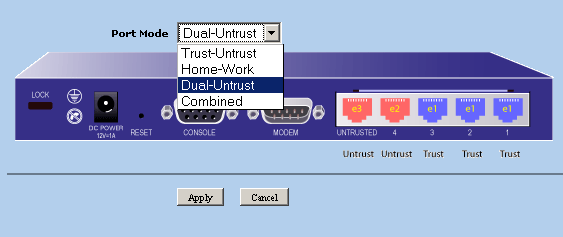
The main limitation of the old Netscreen 5gt was the port modes.


The port mode defines what zone (untrust, trust, dmz etc) each ethernet interface is in. Any time you needed to change this you were required to reset the device and config (see below).

Netscreen 5gt Port Modes.

Netscreen 5gt interface list

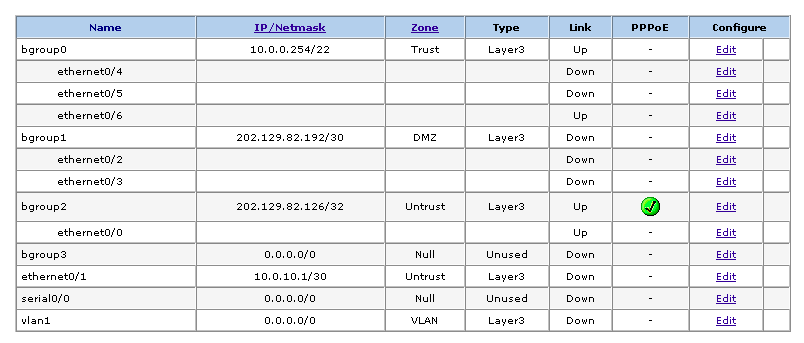
Where as the SSG 5 has something called bridge groups allowing you to easily change what zone each interface is in without resetting the device and/or config.


Much more useful if you're playing round with different network topologies (see below).

Juniper SSG 5 Bridge Groups


I've updated some of the IPSEC benchmarks to include both the SSG 5 and an old Netscreen 100 I picked up.

// post · 578

Spam Server

I found the following address in my logs. Looks like a spamming program. Feel free to try and take it offline.

http://serversinfo.org/VIP/master.php

EDIT: I've changed the message so it spams it own site, hopefully taking itself offline. The stop command didn't seem to work, so this is the next best thing.

EDIT2: Looks like the owner has password protected the area.
// post · 572

Setting up the Secondary IP option on a netscreen with a PPPoE connection.

The following howto will show you how to setup an extra subnet connected to a Netscreen.


Background Info:
  1. Static IP address (202.129.82.126) on ethernet3
  2. /30 Subnet (202.129.82.192/30)
  3. 10.0.0.0/22 Internal Network on ethernet1
  4. Netscreen 5GT running ScreenOS 5.4.0r2 in Dual Untrust mode
  5. PPPoE connection
  6. Router address on 10.0.0.254
Adding an extra subnet gives us the option to run servers on separate IP addresses and bypass the Netscreen's limitation of range port forwarding.


Now what I've done for our connection is attach the extra subnet to our trust interface, the plan being that both the internal network (10.0.0.0) and the new subnet (202.129.82.192/30) can talk to each other.


Another issue is that that the 10.0.0.0 network needs to have a nat'ed connection, while the new subnet needs to be routed. All this is possible on the same interface with a few policy changes.


So Lets start. Please note that process will break your internet connection until all steps have been done.


1) Make sure that your external WAN interface is set to Route mode. This will break your current nat until we fix the policies.

This option can be found in:

Network > Interfaces > ethernet3 (name may be different) -> Edit

WAN Route Mode


2) Now go to your internal LAN interface and check that it too is in route mode and that "Block Intra-Subnet Traffic" is off (allowing the internal interface to pass traffic back out the same interface (i.e. 10.0.0.0 -> 202.129.82.192)

Network > Interfaces > ethernet1 (name may be different) -> Edit

LAN Route Mode


3) Add your Subnet on the internal interface

Network > Interfaces > ethernet1 (name may be different) -> Edit -> Secondary IP

Adding Second Subnet


4) Now we'll setup a policy so that any traffic from 10.0.0.0/22 gets nat'ed out of our static IP address

Policies -> From Trust to Untrust. The source address will be your internal network, destination address will be ANY and so will the service.

10.0.0.0 Nat Policy


5) Click advanced and check "Source Translation", then click okay.

Source Translation


6) Now we'll setup a policy so that our new subnet can talk to the world.

In Policies -> From Trust to Untrust create a basic subnet any rule (of course you can restrict things if you'd like). You don't need "Source Translation" on this one.

Subnet to ANY


7) Now to create a rule to allow traffic in to our new subnet

In Policies -> From Untrust to Trust create a basic any subnet rule (of course you can restrict things if you'd like). You don't need "Source Translation" on this one.

ANY to subnet


8) The last step is to allow traffic from the new subnet to talk to the internal network (this is an optional step).

In Policies -> From Trust to Trust. Source address being your new subnet and destination address is your local network.

Subnet to LOCAL network


Somethings I've noticed with this setup.
  1. You can still use VIPs on your main static ip address (202.129.82.126), so that gives you another IP to play with.
  2. The internal netscreen interface works on the network address for the /30 (i.e. 202.129.82.192) giving us two ip addresses that we can use for servers instead of just one.
// post · 571

Back on the air

We've successfully moved! This new place is pretty awesome, great kitchen and a dishwasher! :)


iinet adsl2+ was connected this morning. We've got the business pack so we currently have one static ip address plus a /30, something we couldn't do cheaply with internode (it would have cost an $100/month with node).


We're hoping to upgrade the current /30 to a /29 (8 IP addresses) later next week (for an extra $64/year).


I've got the netscreen setup so that the /30 works seamlessly with our internal 10.0.0.0/22 network including broadcast traffic (itunes sharing for the win).


So once the cabling is done we'll move the servers back here (about mid jan I would say).
// post · 570

Moving

The guys are moving tomorrow.


Our new address is 30 Wardell Rd Petersham 2049.


This website and anything else hosted here will be offline sometime early Friday while I move the servers to work and update the DNS.


Temporary IP Addresses:


Mail Server: 203.27.228.200

Web/DNS Server: 203.27.228.201